Somewhere in your organization, someone has already asked the question: "We pay for Claude — or ChatGPT, or Copilot. We run SAP. Why can't they talk to each other?"
It's a fair question, and the honest answer used to be uncomfortable: they can, but only after a custom integration project — one that most SAP teams were never given time or budget for. That answer has changed. If your SAP system exposes OData services (and if it runs SAP Gateway, it does), you can connect SAP to Claude, ChatGPT, Claude Code, Codex — any MCP-compatible assistant — through one governed layer in an afternoon, without writing a server and without waiting for a vendor roadmap.
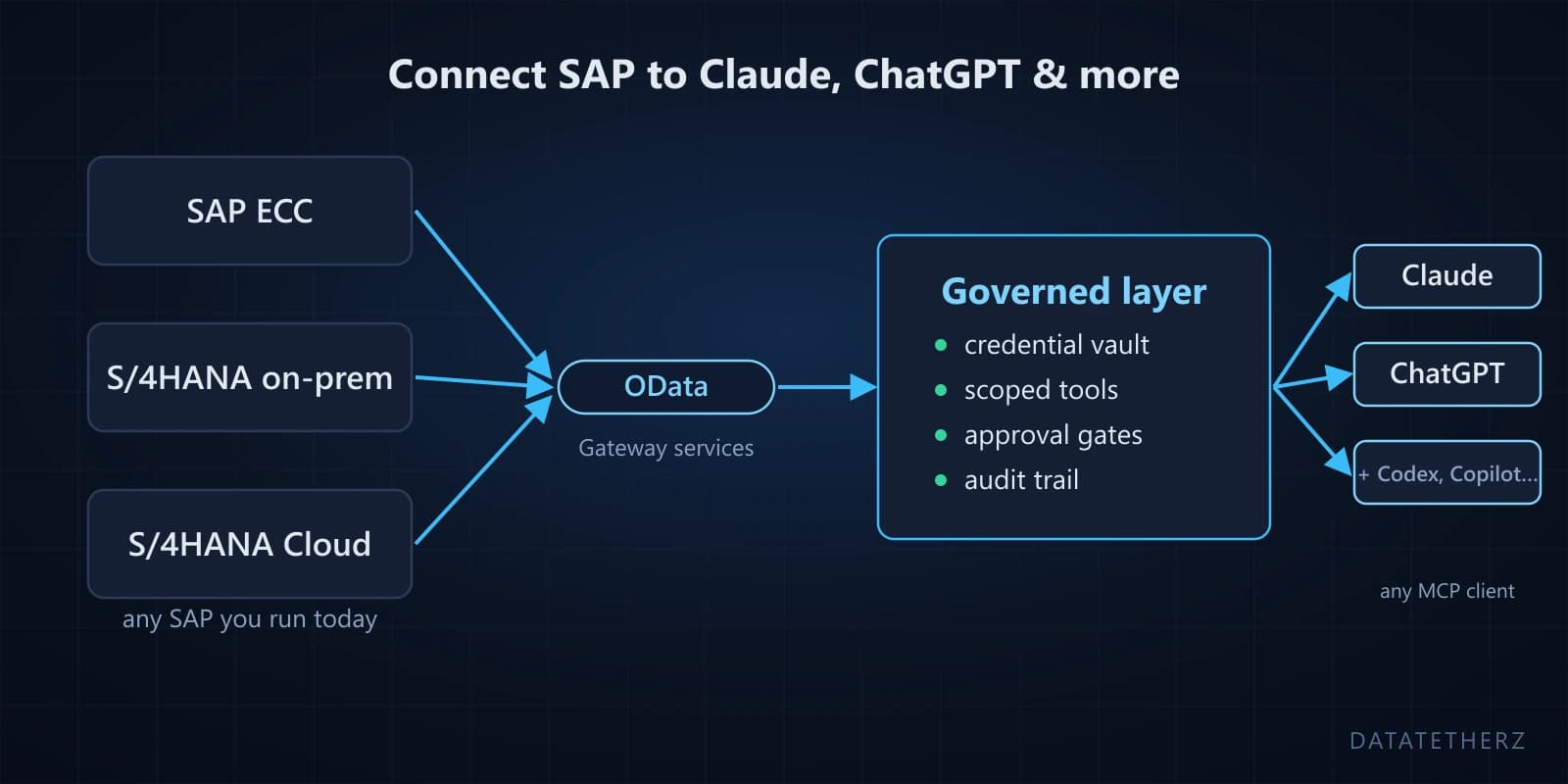
This applies to whatever SAP you actually run: ECC behind Gateway, on-premise S/4HANA, or a cloud S/4HANA where your organization standardised on Claude rather than SAP's own AI stack.
The part SAP already did for you
Every modern SAP landscape exposes OData services — the same interface Fiori apps are built on. A service root like:
https://your-sap-host/sap/opu/odata/sap/API_SALES_ORDER_SRV/
describes itself: its entities, fields, keys, and functions are all published in the service's $metadata document. Sales orders, invoices, customers, stock levels — if there's a Gateway service for it, the machine-readable description already exists.
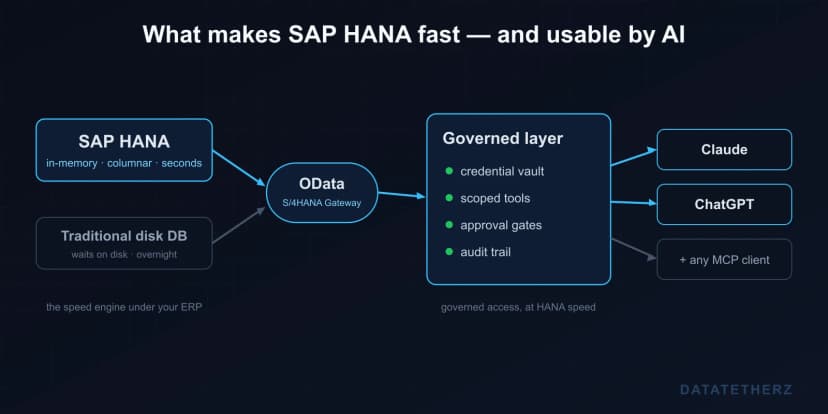
Claude, meanwhile, speaks MCP — the open Model Context Protocol that lets an AI client discover and call tools. The missing piece is the translation between the two, plus the part enterprise teams actually lose sleep over: scoping, credentials, approvals, and audit.
What the connection looks like
With DataTether, the path from service URL to a working Claude connection is a guided flow, not a project:
- Connect — paste the OData service root and choose the auth type your service uses: Basic Auth, SAP session cookies, or OAuth (stored token or client credentials). Credentials go into a vault and are resolved per request — Claude never sees them.
- Discover — the platform reads
$metadata and lists every entity, field, and function the service exposes.
- Configure — you decide what Claude is allowed to touch. Turn on only the entities you need, choose operations per entity (list, get, count, create, update), and select fields down to the individual column. Our recommendation, always: start read-only.
- Connect your AI clients — copy the MCP endpoint URL into Claude, ChatGPT, Claude Code, Codex, or whichever MCP client your team uses. Ask a question. Watch it call the tools you approved — and only those.
No ABAP changes. No transport requests. No middleware server for your team to host and patch. The SAP system is exactly as it was — you've just given it a scoped, governed interface that AI clients understand.
One endpoint, every assistant your business uses
Because the layer speaks standard MCP, the same connection serves whichever assistants your organization has — or adopts next:
- Claude and Claude Desktop — add the endpoint as a connector; the go-to for analysis and long-context work.
- ChatGPT (Team/Enterprise) — the same endpoint as a workspace connector, for the org that standardised on OpenAI.
- Claude Code and Codex — the engineering agents; your developers query SAP data from the terminal while they build.
- Microsoft Copilot Studio and Azure AI Foundry — for Microsoft-stack shops, the endpoint plugs into custom copilots and agents.
- Gemini CLI, Cursor, Windsurf — Google-side and IDE clients that speak MCP out of the box.
- Custom agents — anything built on the MCP SDKs, including internal automations and multi-agent workflows.
The part that matters for the business: this is one setup, not one per assistant. The scopes you defined, the approval gates, the audit trail — all of it applies identically to every client on that list. When leadership switches from one assistant to another next year (they will), your SAP integration doesn't get rebuilt. It gets a new URL pasted into a new settings screen.
"But we can't let AI write to SAP"
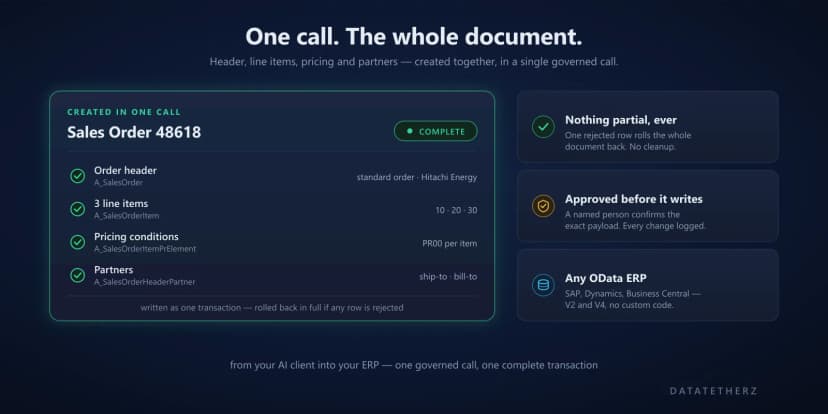
Correct — not unreviewed, you can't. That's why writes work differently from reads. Any create or update operation you enable is held at an approval gate: a named person on your team sees the exact payload Claude wants to send and approves or rejects it before anything touches SAP. Every action — read or write — is logged with identity, payload, approver, decision, and outcome.
That distinction matters more than any feature list, because it's the difference between an AI pilot and something compliance will let you run in production. Reads flow. Writes wait for a human. Nothing changes in SAP without a name attached.
What about Joule?
If you're on S/4HANA Cloud with RISE and all-in on SAP's AI stack, Joule is a real option worth evaluating. But Joule doesn't reach ECC or most on-premise installations, and it doesn't help the many organizations whose AI standard is Claude, ChatGPT, or Copilot rather than SAP's assistant. We've written a separate, honest gap analysis of Joule versus the ECC and on-prem reality if that's your situation.
The short version: you shouldn't have to change your ERP or your AI assistant to get the two working together. OData plus MCP means you don't.
Try it before you point it at SAP
You can see the whole flow against a public demo OData service — no SAP credentials, no signup — in the Northwind walkthrough. Fifteen minutes, end to end.
And when you're ready to run it against your own system, request guided access — we'll walk your first connection through with you, from service URL to Claude asking its first question.

 architecture